Ich interessiere mich dafür. Diese konsolenexklusiven Adventures wollte ich schon gern mal spielen, aber die fehlende Mausunterstützung hat es dann sehr anstrengend gemacht, sodass ich nicht drangeblieben bin. Nur bei Cosmic Spacehead ( Linus Spacehead) war das okay, weil der Adventure-Anteil gering ist und man auch sehr viel Platformer-Abschnitte hat.
(19.07.2026, 18:07)Juttar schrieb: Hatte gerade Soul Calibur II via Dolphin gestartet und musste zu meiner Verwunderung feststellen, dass das Bild plötzlich in 4:3 ist. Hatte dann in den Spieleinstellungen von 16:9 auf 4:3 umgestellt, und jetzt ist das Bild wieder in 16:9. Häh?
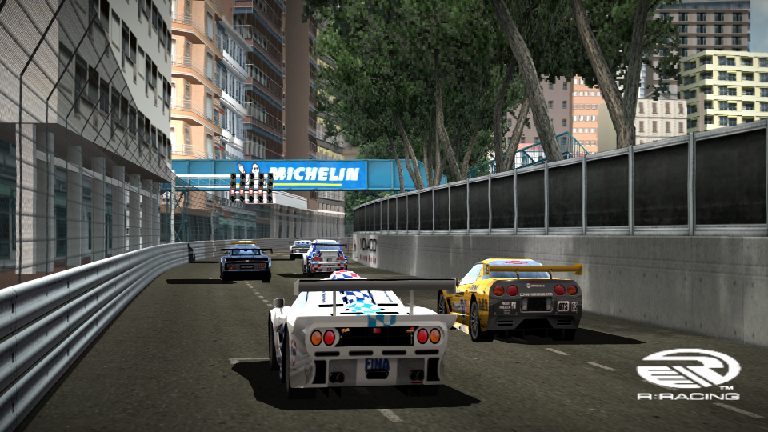
Natürlich hatte ich gleich danach überprüft, ob ich jedes 16:9-Spiel in Dolphin auf 4:3 umstellen muss, dem war aber nicht so. Bloß R:Racing sah seltsam aus; das habe ich mir aber erst gestern genauer angeschaut. Auch R:Racing unterstützt 16:9. Ist das Spiel auf 4:3 eingestellt und Dolphin streckt es in 16:9, dann ist das Bild horizontal gestaucht. Ist das Spiel 16:9 eingestellt und Dolphin 4:3, dann ist das Bild vertikal gestaucht - ist ja logisch. Jetzt kommt's: Ist das Spiel und Dolphin in 16:9, dann ist das Bild trotzdem vertikal gestaucht!
Dabei ist es egal, ob ich bei Dolphin automatisches Seitenverhältnis oder erzwungenes 16:9 einstelle. Und was passiert, wenn ich in Dolphin 4:3 erzwinge und das Spiel ebenfalls in 4:3 läuft? Dann ist es wiederum horizontal gestaucht. Häh?
Dieser Blog-Eintrag hat schon ein paar Jährchen aufm Buckel. Da ich nicht weiß, ob er hier im Board schon gepostet wurde, und weil er bestimmt für den einen oder anderen interessant sein könnte, verlinke ich ihn einfach mal hier im Emulation-Talk:
(03.06.2026, 13:51)Juttar schrieb: Was gibt es Neues von Ymir?
Zitat:App: Removed graphics backend option as it served no purpose at this time. Ymir will rely on the default backend used by the SDL3 Renderer API, which should be compatible with most systems.
Note: GPU rendering will include a rewrite of the app's graphics subsystem, moving away from SDL Renderer to our own implementation.
Na gut, dann gewöhne ich mich lieber nicht daran, in der Grafikschnittstelle "Vulkan" einzustellen.
Ist wieder da.
Zitat: Graphics: New graphics backend, adding support for native graphics APIs:
Direct3D 11 and 12 on Windows (@StrikerX3)
Vulkan on Windows and Linux (TBD)
Metal on macOS (#929; @SternXD)
SDL Renderer wherever it's supported (@StrikerX3)
Nicht missverstehen: Die stabile Version 0.40 von Ymir ist noch nicht da. Ich hoffe aber, es dauert nicht mehr lang.
Ich hatte einen kleinen Bug in PCSX2. Unter der Spieleliste war ein horizontaler Scrollbalken, der dort gar nichts zu suchen hatte. Startete und beendete ich ein Spiel, oder blendete ich einfach die Symbolleiste ein und wieder aus, war er weg. Das hatte mich ein bisschen gestört. Nach ungefähr (oder über?) einem Jahr wurde der Fehler endlich behoben. Diese kleine Änderung ist dafür verantwortlich:
Zitat:Qt: Use QHeaderView::Stretch for the game list title columns
Ich wusste gar nicht, dass redream seit geraumer Zeit wieder weiterentwickelt wird. Beim Ausprobieren der neuesten Version ist mir aufgefallen, dass jetzt Netzwerkfunktionen emuliert werden ("Modem" ist voreingestellt). Ändert nichts daran, dass ich mir auch bei dieser Version aussuchen muss, ob die Spiele in Zeitlupe laufen (Frameskip = aus) oder müde vor sich hinruckeln (Frameskip = auto). Schade! Da bleibe ich bei meiner Lieblingsversion (dessen Versionsnummer ich vergessen habe, aber irgendwo hier im Board müsste ich den Download verlinkt haben).
Ich muss ja sagen, dass ich seit meinem Alone-In-The-Dark-4-Spielversuch noch an keinem weiteren Dreamcast-Spiel dran war, deshalb habe ich noch gar nicht getestet, ob die neueren Versionen auch bei mir Probleme verursachen.
(26.09.2026, 18:04)tomwatayan schrieb: Ich muss ja sagen, dass ich seit meinem Alone-In-The-Dark-4-Spielversuch noch an keinem weiteren Dreamcast-Spiel dran war, deshalb habe ich noch gar nicht getestet, ob die neueren Versionen auch bei mir Probleme verursachen.
Gute Testkandidaten sind Soul Calibur mit Frameskip = off (allein die Titelanimation vor dem Intro läuft bei mir in quälend langsamer Zeitlupe) und Daytona USA 2001 mit Frameskip = auto (allein die Animation im Speichermenü ruckelt bei mir zum Steinerweichen). Mehr getestet habe ich auch nicht. Macht ja auch keinen Sinn, wenn das schon so anfängt.
Ich denke, die haben im Video einen guten Punkt mit dem "Serviceproblem" angesprochen. Wenn sich die Hersteller keine Gedanken um Abwärtskompatibilität machen, werden sich die Spieler nach Alternativen umschauen. Aber gerade bei neuen Titel ist das wohl hauptsächlich für Spieler interessant, die einen High-End-PC haben und sich nicht noch eine Konsole dazu stellen wollen. Aber einen Konsolen-Ersatz wird der PC deswegen vorerst nicht (das Thema gibt es nun auch schon seit Jahren ). Gerade meine noch ganz frische Erfahrung mit dem ersten Witcher hat mich auch eher davon überzeugt, weiterhin bei den Konsolen zu bleiben .
Jetzt gucke ich jeden Tag seit Monaten, welche Fortschritte Ymir macht. Aber den Release von V0.4.0 gestern hab ich irgendwie verpennt. Changelog und Download hier.
Bei Supermodel passiert aktuell so viel, dass ich ernsthaft überlege, mir hier aus Bequemlichkeit bei meinen zukünftigen Uploads den Changelog spare und stattdessen die Textdatei mit allen Änderungen in das Archiv stecke. Allein der Changelog des gestrigen Updates (das dem Emulator eine neue DLL-Datei hinzufügt) ist so lang, dass ich es hier lieber in einen Spoiler packe:
Zitat:Pro-1000 SCSI emulation and wnaspi32.dll (#350)
* scriptsd disassembler is now built alongside ppcd * SCRIPTS disassembler now implements most (all?) instructions (done by Claude, not verified)
* scriptsd: Added 825 mode and made 810 mode default * 53C8xx emulation now supports free-running code execution (up to N instructions at a time or until halted) and Pro-1000 idles cleanly
* CSCSIHostAdapter that simulates the host (i.e., Windows NT PC and its SCSI card) and ISCSIInitiator for target (Pro-1000's SCSI controller) to talk to the host
* Pro-1000 SCSI self-test now sends a WRITE(10) with a packet that writes 4 words to culling RAM, plus a READ(10) of the status reply (temporary test, verified end to end)
* wnaspi32.dll (32-bit build) and TCP SCSI bridge in Supermodel * Real3D (and renderer) made more configurable to supported Pro-1000's 64MB of polygon RAM and disable update buffering, now demos are running
* 33MHz bus on Pro-1000
* Document Pro-1000 frame rendering
* Pro-1000 update memory: Mercury JTAG instruction 9 configures update buffers
The Pro-1000 firmware does not write the Real3D configuration registers at 0x9C000000. Its renderer write function (0x10E3C) sends them to Mercury through JTAG instruction 0x09 (57-bit register, three 19-bit fields).
- CASIC: Mercury implements instruction 9 on Model 3 and Pro-1000. An update writes configuration registers 0x0/0x4/0x8 and a capture reads them back (new CReal3D::ReadConfigurationRegister()), so there is no new state and save states are unchanged. No Model 3 game loads instruction 9 (survey of 26 sets).
- Real3DConfig:ro1000() enables update buffers.
- Synthetic SCSI ROM sets the update memory configuration at +0x3C to 0x7FFC, 0x4, 0x20000 (the SDK defaults).
- Document the SCSI ROM directory format and rend_init load sequence, and add an "Update Memory Configuration" section in Pro1000.cpp. Update the "Update Buffers" documentation in Real3D.cpp.
- Debug log of configuration register writes.
Tested: bayou_short.exe gets the configuration from the ROM, then from the host, and writes go to the update buffers. Model 3 smoke test of 26 sets showed no change.
* Pro-1000: synthetic SCSI ROM in its own file, optional logo database from Assets
Move the synthetic SCSI ROM builder out of CPro1000 intoSrc/Pro1000/SyntheticSCSIROM.cpp/.h (BuildSyntheticSCSIROM(rom, size)) andadd it to Rules.inc and the MSVC project.
If Assets/3dlogo.cmem and Assets/3dlogo.pmem are present (SDK DB_Demos), thesynthetic ROM includes them: the culling data becomes the culling block andthe polygon data polygon block B, loaded by rend_init to culling and polygonword 0. Basic checks: both files present, sizes multiple of 4, known fileversion, header and data sizes consistent, base addresses 0, fits in 512 KB.Otherwise the ROM stays minimal (magic and update memory configuration).
The logo is loaded but not drawn: the ROM has no viewport, and how the real ROM provides one is still open.
Documentation:
- SCSI ROM: +0x0C is the target address of the idle job's 12-word write; uploads during rend_init are 53C825 SCRIPTS memory moves; the SCSI_BLK_MV_DONE time-out messages in Supermodel are an artifact of interrupt latency; PRO_ReloadLogo/LDDB re-run rend_init; no SDK file contains a SCSI ROM image.
- .cmem header format; all SDK .cmem files are relocatable (base 0).
- JTAG mode words set by the firmware, including the Jupiter gamma bypass bit (host command 4, ls_ctrl_gamma).
- Update memory configuration: hypothesis (not emulated) that culling address 0x800000 + i is low culling word i, with the evidence from Bayou's startup scene.
- Fixed the stale note that Pro-1000 update buffers are off.
* Real3D.cpp: TODO describing the two-ping-pong-memory hypothesis and moving update buffers after ping-pong memory.
* Pro-1000 docs: ASIC mode word and RIF bit names, host commands, ping-pong evidence
From the firmware's own name tables:
- Mode word bit names for Jupiter, Mercury, Venus, Earth/Neptune, Mars and Pluto (Mercury bit 4 Block PingPong, bit 5 Force PingPong; Jupiter bit 25 and Pluto bit 7 Gamma Bypass; Jupiter bit 4 Disable Fog).
- RIF_MODE (0x70000000) bit positions.
- Host command list (packet writes to 0x200000xx), e.g. 4 = Gamma Correction, 5 = Reload Default Data base.
Fix the gamma bypass and rend_init mode word descriptions, and the stale SCSI ROM open question.
Real3D.cpp: rewrite the ping-pong TODO. Model 3 games write long-lived ping-pong data exactly twice in consecutive frames, Bayou rewrites all of its ping-pong data on each update, and the firmware writes 0x8E words twice across a flip: evidence for two ping-pong memories. Mark the claim that ping-pong memory A is low culling RAM as weak, since it conflicts with the power-on logo being loaded once through 0x8C000000.
* Update buffers always emulated (we rely on synthetic ROM on Pro-1000 to configure update memory)
* CPro1000Render2D for rendering Pro-1000's scroll layer and an IRender2D interface
* Fix warnings in SCRIPTS disassembler by switching to safer vsnprintf
* Add override keywords to silence compiler warnings
* CJTAG needed virtual destructor so that CASIC pointer could be deleted safely * Added connection dialog to wnaspi32.dll and Supermodel Pro-1000 SCSI bridge accepts remote connections now
* CTC time constant widened to 16 bits from 8 bits to accomodate a value of 256
* Added support for 1, 2, and 4 pixel boards plus variable amount of polygon RAM (for Alaska demo to run)
* Combine IEmulator::Init() and LoadGame() into Init(game, rom_set)
Init() and LoadGame() were always called together, one after the other. One call now allocates memory, initializes the devices, loads the ROMs, and configures the hardware for the game.
- IEmulator, CModel3, CModel3GraphicsState, CPro1000: Init(game, rom_set) replaces Init() + LoadGame(). Main.cpp calls it once.
- CPro1000: the model and polygon memory size are known before the Real3D is initialized, so the size goes into Real3DConfig:ro1000() and the scan chain is built once in Init().
- CReal3D: remove SetInstalledPolygonRAM(). The installed size is now Real3DConfig::installedPolygonRAMSize (Model 3 default: the full 4 MB).
* Replace stepping strings with Game::Stepping enum
- Game::Stepping lists the Model 3 steppings (1.0, 1.5, 2.0, 2.1) and the Pro-1000 models (1100, 1200, 1400). GameLoader maps the Games.xml string to it and ignores a game whose stepping is unknown or not a stepping of its platform (Pro-1000 default: 1100). SteppingName() gives the display name ("Model 3 Step 1.5", "Pro-1100"), shown in the GUI "Hardware" column and the console "Hardware:" line.
- CReal3D: remove SetStepping(). The PCI ID and the single word (Step 1.0) texture port are now Real3DConfig fields, set by Real3DConfig::Model3() and Real3DConfig:ro1000().
- IRender3D::SetStepping() takes Game::Stepping and is called by the emulator's AttachRenderers(). New3D and Legacy3D treat the Pro-1000 as Step 1.0. The shader uniform hardwareStep (int) is now step15Luminous (bool).
- CModel3, CJTAG, CModel3GraphicsState, CPro1000: use the enum. Remove the 0x10/0x15/0x20/0x21 stepping codes, CPro1000::Model, and the Pro-1000 STEPPING constant.
- CJTAG: document SetStepping() as the Model 3 scan chain path; other systems build their own CJTAGScanChain (see CPro1000::BuildScanChain()).
Was fehlt noch? Meine Eindrücke zu Ymir V0.40 (bzw. wurde letzte Nacht noch schnell V0.4.1 nachgeschoben, welche einen Absturz in Windows ARM behebt). Ich hatte ja schon einen Blick auf den ersten Nightly Build geworfen, in dem die Grafikschnittstellenwahl zurückgekehrt war. Die war ein bisschen seltsam, weil außer SDL und DirectX 12 nichts übernommen wurde (auch nicht, wenn ich es manuell in die Konfigurationsdatei eingetragen hatte). Jetzt ist davon in der aktuellen Version nur noch SDL und DirectX 12 übrig (trotzdem wird man auf der GitHub-Seite immer noch darauf hingewiesen, dass man für Vulkan den neuesten Grafiktreiber nutzen sollte). Also hat man die Wahl zwischen SDL und Direct X 12; letzteres entweder mit oder ohne Hardwarebeschleunigung. Ich empfehle DX12 mit Hardwarebeschleunigung: Damit werden auch kleinere Framedrops - auch in Härtefällen wie Virtua Fighter 2 oder Virtua Fighter Kids - komplett eliminiert. Probleme hatte ich mit dieser Option keine (obwohl im Emulator darauf hingewiesen wird, dass jene Option noch experimenteller Natur ist).
Bleiben noch die Sorgenkinder. Battle Arena Toshinden URA stürzt immer noch nach dem Intro ab. Umgehen kann man das, indem man vor dem Intro schnell die Starttaste drückt, solange das Sega-Logo angezeigt wird. Auch Fighters Megamix stürzt immer noch sporadisch ab. Irgendwann bleibt das Emulationsfenster schwarz; auch nach dem Auswerfen der virtuellen Disc. Hier hilft nur ein Reset.
Virtua Fighter bzw. Virtua Fighter Remix flackern immer noch. Ich habe aber das Gefühl, dass das Flackern in Virtua Fighter Remix weniger schlimm ist; außerdem werden dort im Gegensatz zu Virtua Fighter die Schatten korrekt angezeigt.
Ansonsten sind mir keine Probleme aufgefallen - auch nicht mit aktiviertem Deinterlacing (die bei Titeln wie Battle Arena Toshinden URA, Fighters Megamix, Last Bronx, Virtua Fighter 2 oder Virtua Fighter Kids Pflicht sind). Insgesamt war es Version 0.40 wert, monatelang darauf zu warten.
P.S.: Ich weise noch gern darauf hin, dass bei mir das Textformat vom Supermodel-Changelog nicht übernommen wurde, und ich bei jeder neuen Zeile manuell Enter drücken musste. Aber genug gejammert.
(19.10.2026, 13:09)Juttar schrieb: Was fehlt noch? Meine Eindrücke zu Ymir V0.40 (bzw. wurde letzte Nacht noch schnell V0.4.1 nachgeschoben, welche einen Absturz in Windows ARM behebt).
Ein neuer Fehler ist mir jetzt aber doch aufgefallen: In Fighting Vipers fehlen von den Figuren die Hälfte und von den Stages alle Polygone. Hab dann erst die Hardwarebeschleunigung deaktiviert und dann von DX12 auf SDL gewechselt = kein Unterschied. Und Deinterlacing hatte ich gar nicht erst aktiviert (obwohl Fighting Vipers zu den Titeln gehört, bei denen man es einschalten sollte). Unter V0.3.3 ging's noch (glaube ich). Na ja. Das wird schon früher oder später behoben werden.
(21.10.2026, 21:13)Retro-Nerd schrieb: Genesis Plus EX, der Retroarch Core, hat endlich mal eine anständige Window GUI bekommen. So hat man einen schönen Standalone Emulator.
Muss ich bei Gelegenheit mal probieren. Bei Kega Fusion habe ich unter Windows 10 das Problem, dass bei manchen Mega-CD-Spielen der (Audio-CD-) Ton unsynchron zum Spiel läuft. Meine Gegenmaßnahmen (beispielsweise "Perfect Sync" an und aus oder "Use Alternate Timing" an und aus) waren leider nicht von Erfolg gekrönt.





 ). Gerade meine noch ganz frische Erfahrung mit dem ersten Witcher hat mich auch eher davon überzeugt, weiterhin bei den Konsolen zu bleiben


 ro1000() enables update buffers.
 Aber genug gejammert.


